Hacking My Canon EOS 400D for Astrophotography
Unleash the Red: Modding Your Canon EOS 400D for Astro!
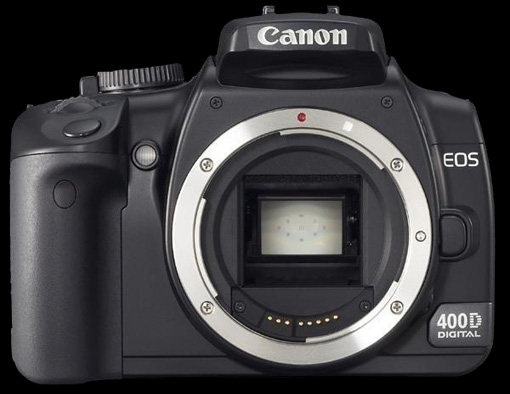
Alright, as promised, here’s a quick-and-dirty tutorial on modifying a Canon EOS 400D! We’re talking about removing that pesky internal IR-Cut filter and swapping it out for a neutral Baader filter. Why bother? Well, this mod seriously boosts your camera’s sensitivity to red light (hello, H-alpha!), letting you capture those gorgeous nebulae and subtle details in deep-sky objects that are otherwise hidden. I went into more detail about the ‘why’ behind this mod in my previous guide on modifying the Canon EOS 350D.
Before we dive in, let’s talk tools! For this EOS 400D mod, you’ll need a few essentials. First and foremost, invest in a really good screwdriver. Seriously, ditch those cheap multi-packs you find for a few bucks; they just won’t give you the grip and torque needed for some of Canon’s notoriously tight screws. This is crucial for success, trust me! What else? A quality soldering iron with some good solder, several toothpicks, some fast-setting gel glue (definitely avoid cyanoacrylate/super glue!), a camera blower, a pair of tweezers (or, even better, electronics pliers), and a small container to keep all those tiny screws and parts organized during disassembly. Oh, and before we start, a huge shout-out to my friend Julio Corredera for his help with this mod and for snapping all the awesome photos you’ll see in this tutorial! Alright, gear up, let’s get started!
Start by removing the battery, Compact Flash card, and the eyecup. Then, systematically remove all the screws from the bottom, sides, and top of the camera body. A quick heads-up: there are two screws on top, tucked away near the metal strap rings, that are a bit sneaky but absolutely need to come out.
Now, open the memory card door and remove the three screws inside. Be super careful not to drop them into the camera’s internals! You’ll also notice a soft plastic piece on the back of the camera, next to the screen. Gently peel that off. No screws are hiding underneath, but removing it makes opening the case in the next step much smoother.
With all screws (hopefully!) removed, carefully open the camera body. If it feels like you’re forcing it, stop immediately and double-check that you haven’t missed any screws. As you open it, be aware that a ribbon cable still connects the two halves of the camera.
Now, disconnect that ribbon cable from the main body side. A toothpick is your best friend here – gently pry up the locking tab, and the cable should slide right out. Voila! The two halves are now completely separated.
Alright, time to focus on the main camera body – the real fun (and challenge!) begins now. Our next mission is to remove the main metal shielding plate. Start by carefully peeling off the black adhesive tape.
This metal plate is actually soldered to the camera’s motherboard, so we’ll need to carefully desolder it. Take your time and be extra gentle, especially around the two solder points on the bottom right. There’s a ribbon cable running right underneath that you can’t see yet, still hidden by the metal plate! I highly recommend using toothpicks to gently pry up the plate while you heat each solder point. This helps break the connections fairly easily.
If all went well, you should now have clear access to the motherboard. Start by unplugging the cable on the right side. A little trick: pull it up and towards you, not straight back, as you might instinctively try.
Keep going by disconnecting all the ribbon cables around the board. There are quite a few, but they’re generally straightforward to unplug. Again, your trusty toothpick will help you gently pry up the locking mechanisms, and then you can pull the cables out of their sockets using the small holes they have. Don’t forget: one ribbon cable is hidden under that black adhesive on the right side of the board. Carefully peel back the adhesive (don’t rip it!), then disconnect the cable underneath.
Don’t fret about reconnecting everything just yet; that’s actually not the hardest part, even if it looks like mission impossible at this stage! Now, for a particularly tricky, almost inaccessible screw. It’s located on the left side of the camera body, hidden behind a plastic piece that you’ll need to make a hole in. Good news: this hole won’t be visible once the camera is reassembled, as it’s covered by the camera’s back panel. To make the hole, I recommend using your soldering iron – it’s cleaner than drilling and avoids creating dust inside the camera.
Hole made, screw removed. Easy peasy!
The motherboard is now detached from the main body, and you can lift it out. Be careful, though, as one cable still connects it to the camera body. Disconnect that, then set the motherboard safely aside. Now, the CMOS sensor holder is finally accessible. Go ahead and unscrew it – you might find a few different screw types here.
Once unscrewed, the sensor holder can be carefully lifted out and flipped over. Yep, it’s still tethered to the body by yet another cable!
This particular cable powers the piezoelectric element next to the sensor, which vibrates a piece of glass in front of the sensor. It’s Canon’s clever solution for dust removal – smart design, but it definitely adds a few extra steps to our modification! Your next task is to unscrew the entire piezo-glass-IR filter assembly to separate it from the CMOS sensor.
Carefully set the CMOS sensor aside, making sure it’s safe and dust-free. Now, we can finally get to the actual modification!
Let’s move on to removing that ‘vibrating glass’ that’s in contact with the piezo element. First, unscrew the screws on the side opposite the piezo to release the glass. Then, remove it with extreme caution – you definitely don’t want to break it, and absolutely avoid leaving any fingerprints! I highly recommend using a toothpick and electronics pliers (or, if you don’t have those, a good pair of tweezers will do the job) to gently lift it out. Once it’s free, set it aside in a clean, safe spot.
Now for the main event: removing the IR filter itself. The only way I’ve found to get this out is to carefully break it by applying gentle pressure, then use tweezers to pick out all the tiny glass shards.
With the holder now clean and free of any IR filter residue, apply a thin bead of gel glue all around the perimeter. You can use a toothpick for precision, or apply directly if you have a super steady hand!
Alright, this is arguably the most delicate part of the whole modification: placing your new filter! Hold the filter by its edges with two fingers. Carefully align the bottom edge of the filter with the bottom of the holder. Once it’s perfectly aligned, gently release the filter, allowing it to drop and fully adhere to the holder. Finish by applying light pressure around the edges with a clean toothpick to ensure a good seal.
Once the glue is dry (give it about 10 minutes), use your camera blower to meticulously remove any specks of dust from the new filter.
Now, for the reassembly! Simply follow the steps of this tutorial in reverse order. Pay extreme attention to detail – you absolutely do not want to leave any fingerprints or dust on the sensor, your new Baader filter, or that ‘vibrating glass.’ The cleanliness of these components is paramount to the quality of your modified camera!
Best of luck with your Canon EOS 400D modification! Just a quick disclaimer: this tutorial is unofficial, and I cannot be held responsible for any damage that might occur to your camera during this process. Proceed at your own risk, and have fun!